Endlessh (SSH Tarpit): Trapping Hacker Bots for Weeks on Your VPS

🇺🇦 Читати цю статтю в оригіналі українською
Anyone who has deployed a public VPS server knows the sobering reality: within 15 minutes of provisioning an IP address, your system log (/var/log/auth.log) starts bursting at the seams.
Hundreds of automated botnets and script-kiddies scan port 22 relentlessly around the clock, brute-forcing pedestrian credentials: admin, root, test, qwerty.
Traditionally, system administrators respond with standard defensive measures:
- Moving OpenSSH to a non-standard port.
- Installing
fail2banto drop IP addresses after consecutive failed authentication attempts.
However, consider this: when fail2ban severs an attacker’s TCP connection, the bot instantly reclaims its network socket and immediately targets its next victim. What if, instead of kicking the bot out… you forced it to wait for eternity?
This is the principle behind an SSH Tarpit, and the gold standard implementation is a tiny utility called Endlessh.
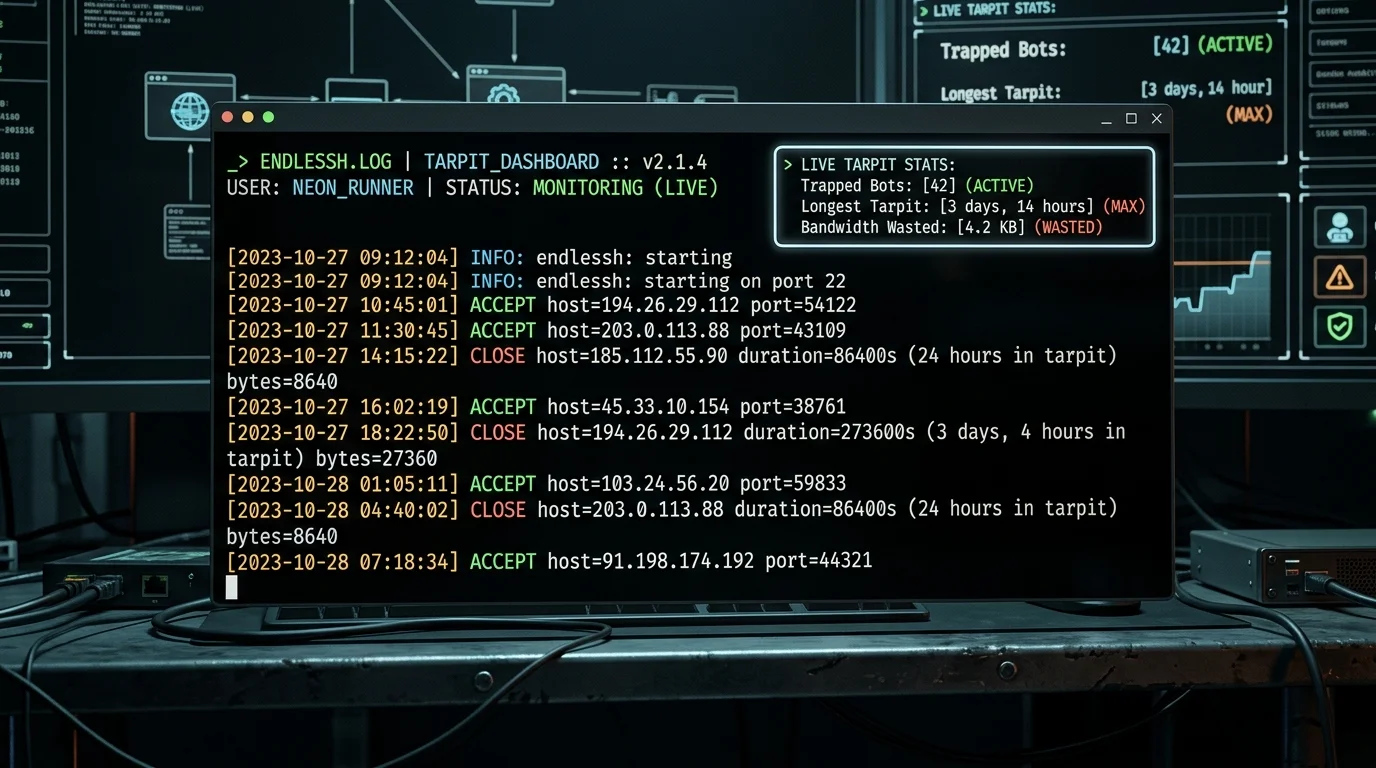 Fig. 1. Endlessh terminal logs: automated bots stuck in the tarpit for 24 hours and over 3 days
What is Endlessh and How Does a Tarpit Work?
According to the official SSH protocol specification (RFC 4253, Section 4.2), before the client and server exchange their protocol version strings, the server is permitted to transmit arbitrary textual header banners. The client is obligated to wait for and parse this input.
Endlessh exploits this standard with mischievous elegance:
- An automated bot hits port 22 expecting an OpenSSH prompt.
- Endlessh accepts the connection immediately, but never prompts for credentials.
- Instead, it transmits random lines of banner text at a glacial crawl: one line every 10 seconds.
- Standard automated brute-forcing scripts rarely enforce aggressive timeouts during the pre-auth banner phase. Consequently, they get hooked and hang open for hours, days, or even weeks.
1
2
3
4
5
6
7
8
9
[ Malicious Bot ]
        │
        ▼ (Connection attempt on port 22)
[ Endlessh Tarpit ]
        │ ── (Line 1) ──> [Waits 10 seconds...]
        │ ── (Line 2) ──> [Waits 10 seconds...]
        │ ── (Line 3) ──> [Waits 10 seconds...]
        ▼
   Bot socket locked up for weeks! Attacker resources depleted.
Written in C (or Go), Endlessh relies on asynchronous non-blocking poll() routines, consuming under 2–3 MB of RAM while easily maintaining thousands of simultaneous attacker sockets!
Step 1. Relocating Real OpenSSH to a Protected Port
Before setting up the trap on port 22, move your genuine administrative SSH listener to an alternative port (e.g., 2222).
⚠️ Warning: Keep your existing terminal session alive until you confirm successful login via a secondary window, ensuring you do not lock yourself out!
- Edit the SSH daemon configuration:
1
sudo nano /etc/ssh/sshd_config - Locate
#Port 22orPort 22, uncomment it, and update it:1
Port 2222
- If using UFW firewall, allow the new port:
1
2
sudo ufw allow 2222/tcp
sudo ufw reload
- Restart the OpenSSH daemon:
1
sudo systemctl restart ssh - Mandatory Verification: Open a new terminal on your local machine and verify connectivity:
1
ssh -p 2222 user@your-server-ip
Once logged in, standard port 22 is officially liberated for the tarpit!
Step 2. Deploying Endlessh via Docker
The cleanest deployment path is running the containerized endlessh-go build, which includes native Prometheus metric export:
- Create a project directory:
1
sudo mkdir -p /opt/endlessh && cd /opt/endlessh
- Write
docker-compose.yml:1 2 3 4 5 6 7 8 9 10 11 12 13 14
version: '3.8' services: endlessh: image: ghcr.io/shizuma/endlessh-go:latest container_name: endlessh restart: unless-stopped ports: - "22:2222" # Map external port 22 to internal container port - "2112:2112" # Prometheus metrics (optional) environment: - ENDLESSH_MS_DELAY=10000 # Delay between lines (10,000 ms = 10s) - ENDLESSH_MAX_CLIENTS=4096 # Concurrency ceiling - ENDLESSH_LOG_LEVEL=info
- Launch the container:
1
docker compose up -d
Ensure port 22 is accessible in your host firewall (sudo ufw allow 22/tcp).
Step 3. Observing the Trapped Bots (Live Logs)
Within 10–20 minutes, the first automated probes will stumble into the tar pit. Tail the container logs:
1
docker logs -f endlessh
You will witness an amusing timeline:
1
2
3
4
2026-09-27T12:30:15Z ACCEPT host=194.26.29.112 port=54122
2026-09-27T12:35:42Z ACCEPT host=45.33.10.154 port=38761
2026-09-27T13:14:02Z CLOSE host=185.112.55.90 duration=86400s (24 hours in tarpit) bytes=8640
2026-09-27T18:22:50Z CLOSE host=194.26.29.112 duration=273600s (3 days, 4 hours in tarpit) bytes=27360
Notice the duration metric:
- Some scanning tools time out after 15 seconds.
- However, stubborn botnets remain trapped for 24 hours, and frequently for 3 to 4 consecutive days!
- Throughout that entire duration, the bot holds an active TCP connection, exhausts attacker thread pools, and is incapacitated from targeting other machines across the internet.
- Meanwhile, your VPS dispatched a mere 27 kilobytes of junk text over the course of 3+ days.
Bonus: Monitoring with Prometheus & Grafana
Because endlessh-go serves metrics on port 2112/metrics, you can seamlessly hook it into the Prometheus + Grafana stack we built previously. Add this scrape target to Prometheus:
1
2
3
4
scrape_configs:
  - job_name: 'endlessh'
    static_configs:
      - targets: ['localhost:2112']
Community Grafana dashboards (such as ID 14197) offer instant visual metrics:
- Real-time count of currently trapped bots.
- Longest connection hold records.
- Saved bandwidth metrics and attacking IP geolocations.
Conclusion: Active Defense and Internet Hygiene
Endlessh is more than just a satisfying counter-trolling mechanism — it represents active community defense:
- Resource Preservation: Instead of forcing OpenSSH to fork processes and evaluate thousands of crypto handshakes, Endlessh ties up bots with a single thread.
- Global Threat Mitigation: Botnets operate with finite concurrent socket pools. By locking up 100–200 bot threads on your VPS, you tangibly shield vulnerable unpatched servers worldwide from being scanned.
Deploy Endlessh on your VPS — watching your security logs has never been this rewarding! 🪤✨