Goodbye 1970s: 5 Modern CLI Tools that Replace ls, cat, top, cd and neofetch for Good
🇺🇦 Читати цю статтю українською мовою
Pause and reflect for a moment: it is 2026. We deploy servers with dozens of gigabytes of high-frequency RAM, multi-threaded server CPUs, and NVMe drives capable of 7,000 MB/s read throughput. Yet, when interacting with the command line, roughly 90% of engineers still rely on utilities architected for PDP-11 teleprinters in the early 1970s.
The standard cat utility spits out ten thousand lines of code as an unformatted monochrome wall of text. The default ls cannot differentiate file types with icons or indicate Git state, while top looks like it was formatted with punch cards.
A vibrant wave of modern open-source command-line utilities — engineered primarily in Rust, C++, and Go — fixes this disconnect. They preserve the Unix philosophy (do one thing and do it well) while introducing rich color palettes, syntax highlighting, native Git telemetry, and blistering execution speeds.
Here is a breakdown of the top 5 modern CLI tools that will make you never want to return to legacy defaults.
1. eza Instead of ls: The Intelligent Directory Explorer
The original ls utility debuted in Unix Version 1 back in 1971. While reliable, it remains fundamentally blind: it lacks built-in color differentiation by file category without tedious flags, ignores version control state, and requires an auxiliary tree binary just to visualize folder hierarchies.
Its definitive successor is eza (the actively maintained, community-driven Rust rewrite of the legendary exa).
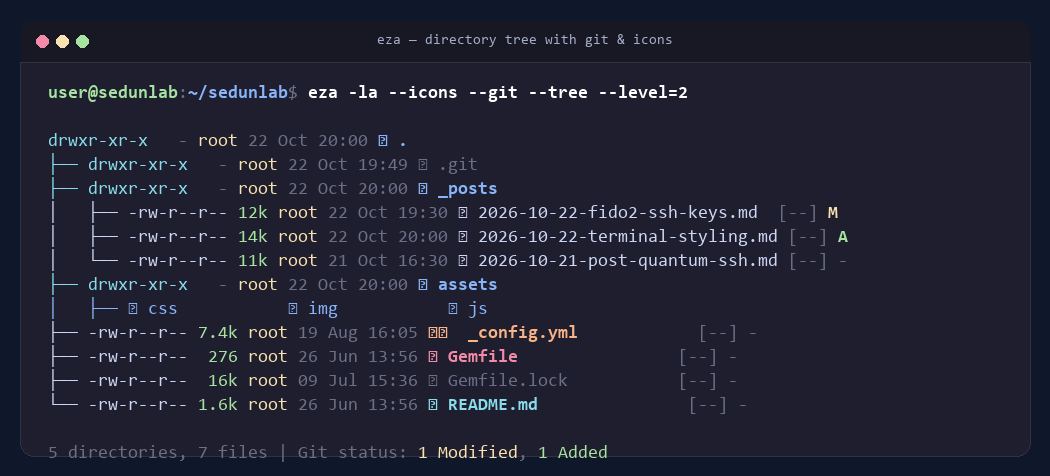 Fig. 1. Tree-based eza listing: vector file icons, human-readable colorized file sizes, and Git status indicators
Highlights of eza:
- Vector File Icons: Automatically attaches recognizable glyphs to common formats (
Gemfile,.yml,.py,.md, archives, binaries). - Deep Git Integration: Appends repository status directly beside file metadata:
M(Modified),A(Added),-(Unmodified). - Built-in Tree Visualizer: The command
eza --tree --level=2renders recursive folder structures natively. - Intelligent File Sizing: Replaces raw byte counts with legible values like
12kor2.1M, dynamically colorized based on file size tiers.
How to Install:
1
2
3
4
5
6
7
8
9
10
11
# Ubuntu / Debian:
sudo apt install eza -y

# Fedora / AlmaLinux / RHEL:
sudo dnf install eza -y

# macOS:
brew install eza

# Windows (via winget):
winget install eza-community.eza
Essential Aliases for ~/.bashrc or ~/.zshrc:
1
2
3
alias ls="eza --icons"
alias ll="eza -la --icons --git"
alias lt="eza --tree --level=2 --icons"
2. bat Instead of cat: A Cat with Wings and Syntax Highlighting
The cat (concatenate) utility was initially designed to merge sequential streams, but developers use it 99% of the time as a fast viewer for configuration files and source code. The drawback: cat is completely syntax-agnostic. A 500-line JSON payload, an Nginx virtual host, or a Python script renders as flat, unreadable gray text.
bat is a Rust-engineered clone of cat on steroids.
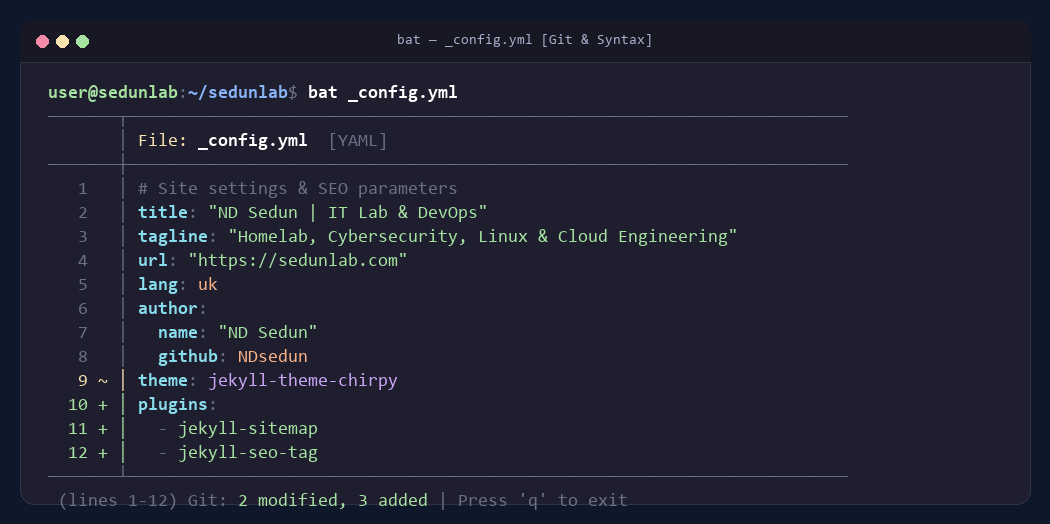 Fig. 2. Inspecting configuration files in bat with syntax highlighting, line numbers, and Git modification markers
Highlights of bat:
- Syntax Highlighting for 200+ Languages: Detects formats automatically by file extension or script shebang (
#!/bin/bash). - Sidebar Git Diffs: If viewing files inside a Git repository,
batdisplays vertical gutter markers: green+for new additions, amber~for modifications. - Intelligent Auto-Pager: If a file exceeds your terminal window height,
batautomatically pipes output through aless-style scroll viewer. For short files, it prints immediately without trapping your cursor. - Invisible Character Detection: The
-Aflag reveals hidden tabs, spaces, and trailing newline variations (CRLFvsLF).
How to Install:
1
2
3
4
5
6
7
8
9
10
11
12
13
# Ubuntu / Debian:
sudo apt install bat -y
# Note: On Debian/Ubuntu the binary might be named batcat. Create a symlink:
# mkdir -p ~/.local/bin && ln -s /usr/bin/batcat ~/.local/bin/bat

# Fedora / AlmaLinux / RHEL:
sudo dnf install bat -y

# macOS:
brew install bat

# Windows:
winget install sharkdp.bat
Recommended Alias:
1
alias cat="bat --paging=never"
3. btop Instead of top & htop: Sci-Fi Resource Telemetry
Launch standard top and you are greeted by an anxiety-inducing, flickering wall of text. While htop offered a huge leap forward by introducing colorized progress bars, the gold standard in modern environments is btop (written in high-efficiency C++).
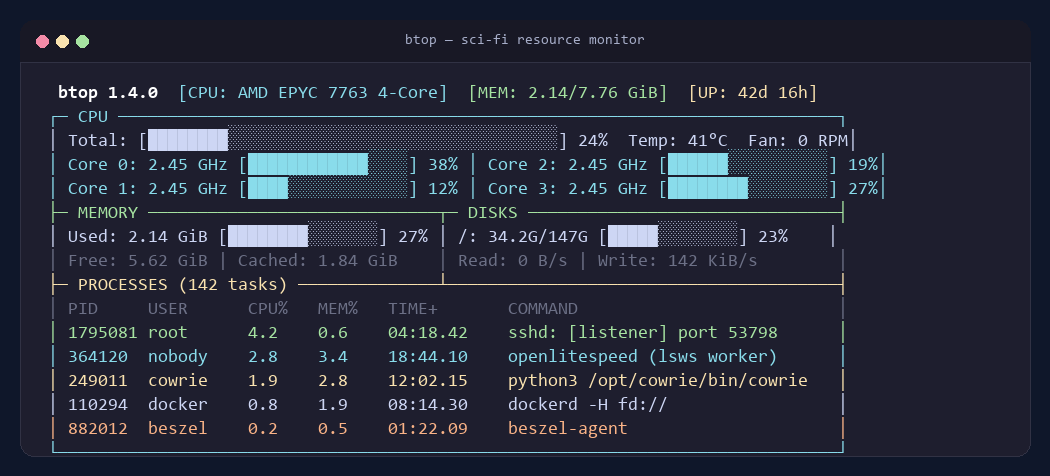 Fig. 3. Cybernetic telemetry with btop: per-core frequency graphs, live disk I/O, network bandwidth, and process trees
Highlights of btop:
- Futuristic Interface: Clean HUD aesthetic featuring smooth graphs drawn with Unicode Braille characters.
- Holistic Hardware Metrics: Dedicated panels for CPU (displaying per-core frequency and temperatures), memory usage, storage I/O, and network telemetry.
- Native GPU Tracking: Seamless out-of-the-box monitoring for Nvidia, AMD, and Intel graphics processors.
- Effortless Process Control: Quick filtering via
f, hierarchical process trees viat, and instantSIGTERM/SIGKILLdispatching without looking up process IDs manually. - Full Mouse Support: You can click tabs, scroll lists, and terminate tasks directly using your trackpad or mouse inside the CLI.
How to Install:
1
2
3
4
5
6
7
8
9
10
11
# Ubuntu / Debian:
sudo apt install btop -y

# Fedora / AlmaLinux / RHEL:
sudo dnf install btop -y

# macOS:
brew install btop

# Windows:
winget install aristocratos.btop4win
4. fastfetch Instead of Deprecated neofetch: Instant System Identity
We have all seen those satisfying screenshots across r/unixporn: distribution ASCII art on the left, hardware statistics on the right. For over a decade, neofetch was the undisputed king of system summaries.
However, in May 2024, the creator of neofetch officially archived the repository, retiring from software development. Furthermore, legacy neofetch was an expansive Bash script that could take several seconds to execute on remote servers.
Enter fastfetch — built from the ground up in pure C with an absolute focus on performance and modularity.
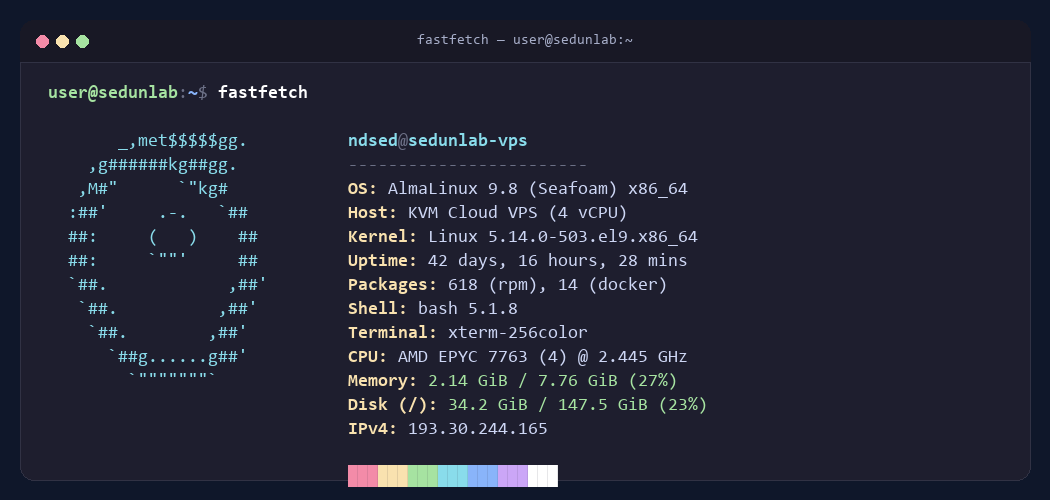 Fig. 4. Near-instantaneous system identification with fastfetch featuring memory metrics, uptime, and kernel details
Highlights of fastfetch:
- Blistering Execution: Runs in 10 to 20 milliseconds (up to 20x faster than neofetch). It is light enough to execute on every SSH login without slowing down shell startup.
- Modular Configuration: Supports JSON-based layout schemas ranging from a 3-line micro-badge to comprehensive enterprise diagnostics.
- Deep Hardware Auditing: Surfaces active Docker container counts, battery health cycles, compiler versions, and public/private IP addresses automatically.
How to Install:
1
2
3
4
5
6
7
8
9
10
11
# Ubuntu 24.04+ / Debian 13+:
sudo apt install fastfetch -y

# Fedora / AlmaLinux 9+:
sudo dnf install fastfetch -y

# macOS:
brew install fastfetch

# Windows:
winget install Fastfetch-cli.Fastfetch
Add fastfetch to the top of your ~/.bashrc to enjoy a sleek briefing every time you open a terminal or connect over SSH.
5. zoxide Instead of cd: Effortless Directory Teleportation
How many times per day do you type tedious paths like:
1
cd /var/www/vhosts/sedunlab.com/jekyll_site/_posts/
Make a single typo, and you are forced to backspace, hit Tab, and rebuild the command.
zoxide is a smarter cd replacement that learns your habits using a Frecency algorithm (evaluating both visit frequency and recency).
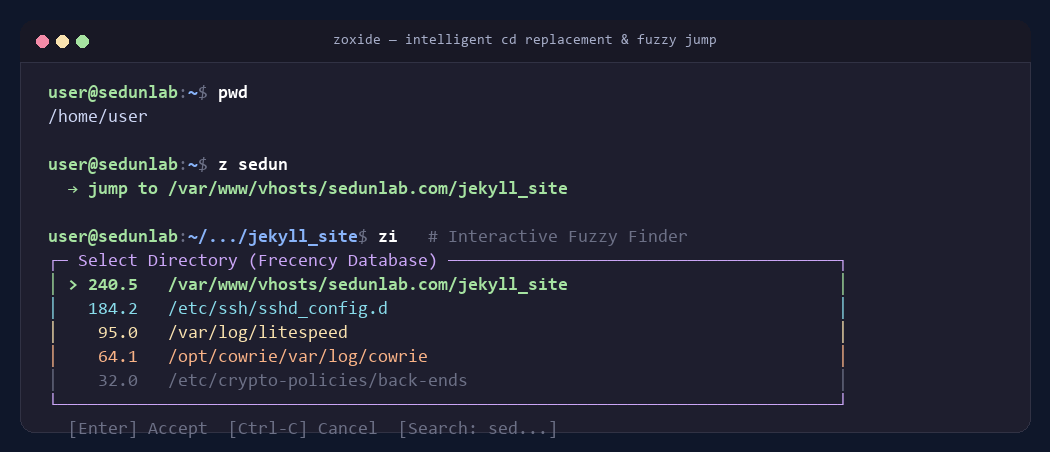 Fig. 5. Rapid teleportation via zoxide and interactive directory selection using zi
How It Works in Practice:
Navigate to a target directory once using traditional methods. From that point forward, from any working directory on your system, simply execute:
1
2
3
z posts
# Or even:
z sedun
zoxide parses your history and teleports you directly into /var/www/vhosts/sedunlab.com/jekyll_site/_posts/ instantly.
If multiple directories share similar keywords, invoke:
1
zi
This triggers an interactive Fuzzy Finder menu allowing you to pick your target location with arrow keys or partial typing.
How to Install:
1
2
3
4
5
6
7
8
# Universal POSIX Script (Linux / macOS):
curl -sSfL https://raw.githubusercontent.com/ajeetdsouza/zoxide/main/install.sh | sh

# macOS:
brew install zoxide

# Windows:
winget install ajeetdsouza.zoxide
Shell Initialization:
- Bash (
~/.bashrc):eval "$(zoxide init bash)" - Zsh (
~/.zshrc):eval "$(zoxide init zsh)" - PowerShell (
$PROFILE):Invoke-Expression (& { (zoxide init powershell | Out-String) })
Comparison Matrix: Legacy Tools vs The Modern Stack
| Legacy Utility | Modern Replacement | Language | Primary Advantage |
|---|---|---|---|
ls | eza | Rust | Vector icons, Git telemetry, tree views, human sizing |
cat | bat | Rust | Syntax highlighting, line numbering, Git diffs, auto-pager |
top / htop | btop | C++ | Braille-rendered hardware graphs, GPU stats, mouse support |
neofetch | fastfetch | C | 10ms execution, actively maintained, low footprint |
cd | zoxide | Rust | Frecency-based 2-letter directory jumping |
Ready-to-Use Shell Aliases
Drop these definitions directly into your ~/.bashrc, ~/.zshrc, or PowerShell profile to seamlessly adopt the new stack without breaking muscle memory:
1
2
3
4
5
6
7
# Modern CLI Ecosystem
alias ls="eza --icons"
alias ll="eza -la --icons --git"
alias lt="eza --tree --level=2 --icons"
alias cat="bat --paging=never"
alias top="btop"
alias cd="z"
Conclusion
The command line is the primary workstation of the modern engineer. There is no reason to settle for teleprinter-era monochrome interfaces when modern open-source tooling makes terminal navigation faster, more intuitive, and visually inspiring.
Upgrade your toolkit over Friday morning coffee — and make your command line a joy to work in! ☕🚀