Local AI Coding Assistant in Your Terminal: Aider + Ollama with Zero Cloud Subscriptions
🇺🇦 Читати цю статтю українською мовою
Just a year ago, AI-assisted software engineering was almost exclusively synonymous with paid SaaS subscriptions: $10–$20 monthly for GitHub Copilot, proprietary forks of VS Code like Cursor, or specialized IDE extensions bound to paid API tokens from OpenAI and Anthropic.
However, commercial cloud-based AI tools pose two critical drawbacks:
- Intellectual Property Leaks: If you work on proprietary internal codebases, NDA-bound client projects, or regulated financial applications, piping private code to third-party telemetry clusters is strictly prohibited by security compliance.
- Subscription Fatigue and Outage Vulnerability: The moment your internet drops during travel or commercial APIs suffer rate limits and 500-series server crashes, your AI-assisted workflow completely freezes.
The open-source AI landscape has dramatically shifted. Thanks to state-of-the-art open-weights models (specifically Qwen 2.5 Coder and DeepSeek-Coder) combined with two high-leverage tools — Aider and Ollama — you can run an autonomous, full-featured AI pair programmer directly in your terminal.
It runs 100% offline, costs zero subscription dollars, maps your Git repository, edits files directly on disk, runs tests, and authors clean, granular Git commits automatically!
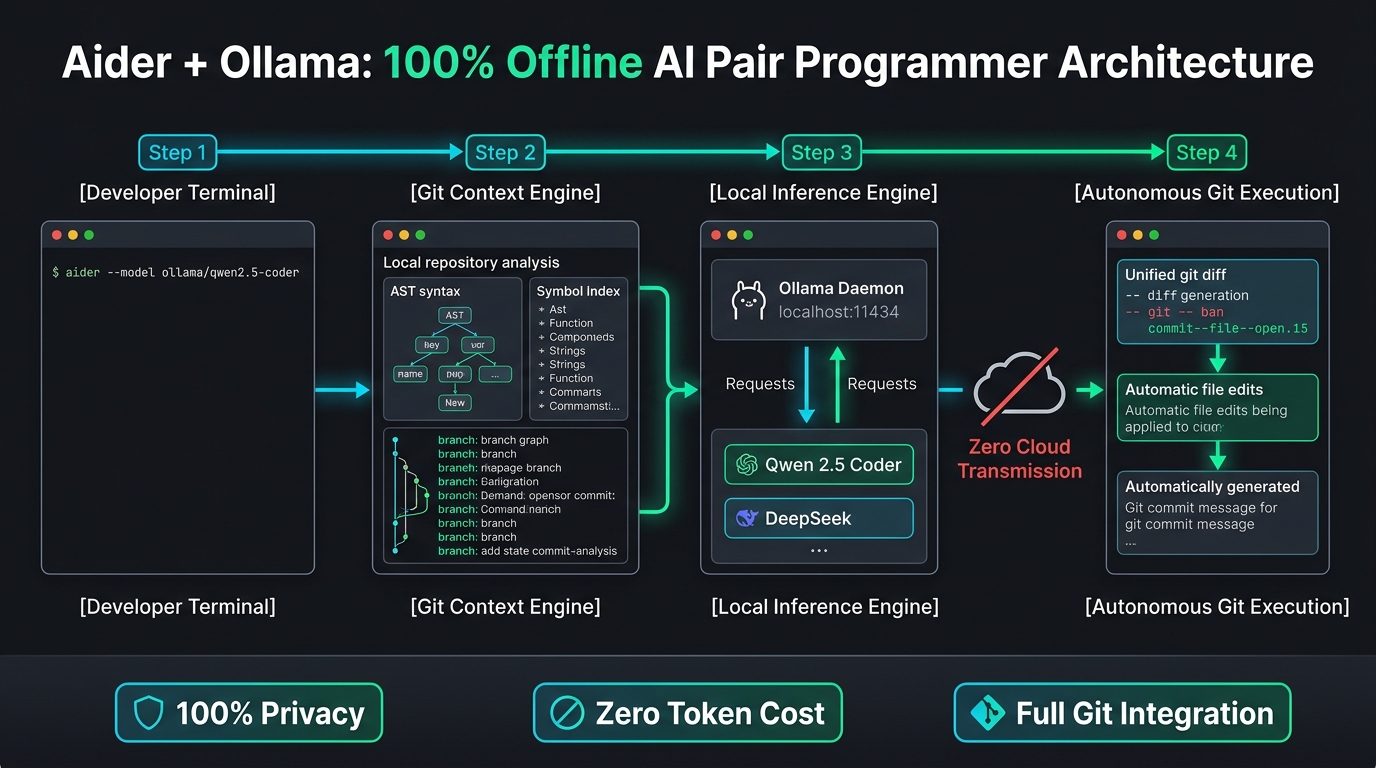 Fig. 1. Architecture of a local AI pair programmer: how Aider traverses the Git repository map and coordinates with the local Ollama inference daemon
Why Aider Beats Traditional Web Chatbots
Most developers begin by manually copy-pasting code snippets into ChatGPT or Claude, asking for fixes, and then manually pasting the output back into their IDE. This is slow, error-prone, and frequently results in broken indentation or missing brackets.
Aider operates on a completely different paradigm:
- Holistic Repository Mapping: Utilizing the Tree-sitter abstract syntax tree library, Aider builds an in-memory map of your codebase’s functions, classes, and types. The model understands relationships between modules, even if you never explicitly feed those files into the chat.
- Autonomous File Editing: Say goodbye to copy-paste. Aider generates precise unified Git diffs and applies edits directly to your local working directory.
- Automated Git Commits: Upon successfully completing an instruction, Aider executes
git addand composes a concise, professional commit message (e.g.,feat: implement bcrypt password hashing in auth module). If you dislike the change, a single/undocommand reverts the working tree instantly. - Test-Driven Self-Correction: Instruct Aider via
/test pytest— it executes the test suite, parses the error stack trace, diagnoses the root cause, and edits the code iteratively until all tests pass!
Selecting the Ideal Local Coding Model (2026)
To ensure reliable code synthesis and accurate unified diff formatting, you need a model specialized in syntax trees and software architecture. Currently, Alibaba’s Qwen 2.5 Coder family dominates open-weights code generation:
| Model Tag | Disk Size | Required Memory (RAM / VRAM) | Recommended Hardware & Workload |
|---|---|---|---|
qwen2.5-coder:7b | ~4.7 GB | 8–12 GB RAM (or 6–8 GB VRAM) | The sweet spot for laptops and standard PCs. Runs smoothly on Apple Silicon (M1–M4) or an entry-level RTX 3060/4060 GPU. |
qwen2.5-coder:14b | ~9.0 GB | 16–24 GB RAM (or 12–16 GB VRAM) | Ideal balance of depth and speed. Exceptional for large refactoring tasks and multi-file dependencies. |
qwen2.5-coder:32b | ~20 GB | 32–48 GB RAM (or RTX 3090/4090 / Mac 36GB+) | Competitive with frontier commercial models like Claude 3.5 Sonnet / GPT-4o on standard coding benchmarks. |
deepseek-coder-v2:16b | ~8.9 GB | 16 GB RAM | A brilliant Mixture-of-Experts (MoE) model tailored for complex algorithmic challenges. |
For 90% of daily engineering tasks, qwen2.5-coder:7b delivers the ideal compromise between speed and code accuracy.
Step 1: Installing and Launching Ollama
Ollama provides the simplest way to manage and serve local models, utilizing GPU acceleration (NVIDIA CUDA, AMD ROCm, or Apple Metal) out of the box.
Install the engine:
1
2
3
4
5
6
7
8
# Linux (Official installation script):
curl -fsSL https://ollama.com/install.sh | sh

# macOS:
brew install ollama

# Windows:
winget install Ollama.Ollama
Download and test the coding model:
1
ollama run qwen2.5-coder:7b
Type /bye to exit the interactive prompt. The Ollama daemon remains running as a background service listening on localhost:11434.
Step 2: Installing Aider CLI
Aider is distributed via Python’s package ecosystem and installs in seconds.
The recommended installation is through the fast package manager uv or pipx:
1
2
3
4
5
# Recommended via uv:
uv tool install --force --reinstall aider-chat

# Or standard pip:
pip install aider-chat
Verify your installation:
1
aider --version
Step 3: Launching Aider Inside Your Repository
Navigate to the root of any existing Git repository:
1
cd ~/my-awesome-project
Launch Aider targeting your local Ollama daemon:
1
aider --model ollama/qwen2.5-coder:7b
Aider will index your project files, construct an AST repository map, and initialize an interactive prompt:
1
2
3
4
5
6
7
Aider v0.70.0
Model: ollama/qwen2.5-coder:7b with whole edit format
Git repo: .git with 42 files
Repo-map: using 1024 tokens
Use /help <question> for help, run /exit to quit.

my-project>
Daily Workflow: Coding with Aider
Aider is built around intuitive slash-commands and natural language guidance.
1. Adding Files to Context (/add)
Keep token consumption focused by adding only the files relevant to your task:
1
> /add src/auth.py src/models.py
(Tip: Use /read-only src/config.py for files you want the model to inspect without altering).
2. Instructing in Natural Language
Formulate what you need the agent to build:
1
> Add email validation using regex in auth.py and update the User database model accordingly.
Aider will:
- Outline the proposed architectural changes.
- Formulate the unified diffs.
- Apply edits directly to
src/auth.pyandsrc/models.py. - Create an atomic Git commit automatically:
1
Commit 4f2a1b9 feat: add regex email validation to auth module
3. Automated Test-and-Fix Loops (/test)
The ultimate quality assurance capability:
1
> /test pytest tests/test_auth.py
If a test fails, Aider doesn’t ask you what went wrong. It parses the traceback, inspects the failure assertion, fixes the source code, and re-executes the test until the entire suite passes!
4. Rolling Back Undesired Changes (/undo)
If the model heads in the wrong direction, do not edit files manually. Simply execute:
1
> /undo
Aider rolls back the last commit, restoring your working tree to its exact prior state.
Quality of Life: .aider.conf.yml
To bypass passing CLI flags repeatedly, save a global configuration at ~/.aider.conf.yml:
1
2
3
4
5
6
7
8
9
10
11
12
# ~/.aider.conf.yml
model: ollama/qwen2.5-coder:7b

# Enable automatic Git commits
auto-commits: true

# Prepend commit prefixes
commit-prompt: "feat: {message}"

# Terminal UI enhancements
dark-mode: true
pretty: true
Now, inside any Git repository on your machine, launch your assistant with a single command:
1
aider
Comparison: Cursor / Copilot vs Aider + Ollama
| Metric | GitHub Copilot | Cursor IDE | Aider + Ollama (Local) |
|---|---|---|---|
| Cost | $10+/month | $20+/month | 100% Free Forever |
| Privacy & NDA | Code streams to Microsoft | Code streams to Cursor cloud | Zero Outbound Traffic (localhost) |
| Offline Reliability | Requires Internet | Requires Internet | Functional Anywhere |
| Git Integration | In-editor hints | File updates | Auto-diffs + Auto-commits + Auto-tests |
| Editor Lock-in | VS Code / JetBrains | Bespoke VS Code Fork | Any Terminal, Vim, Neovim, Emacs, IDE |
Conclusion
The pairing of Aider + Ollama + Qwen 2.5 Coder represents a monumental leap forward for developer autonomy.
You no longer have to compromise proprietary source code, balance monthly subscription tiers, or worry about cloud outages. Modern open-weights models possess more than enough algorithmic capability to handle the majority of day-to-day coding tasks: unit tests, refactoring, boilerplate generation, and bug fixing.
Set up this stack today, and turn your terminal into an offline, privacy-first AI development studio! 💻🚀