Model Context Protocol (MCP): The “USB-C for AI” Explained and How to Build Your First Server
🇺🇦 Читати цю статтю українською мовою
Think back to personal computing in the late 1990s: connecting a mouse required a PS/2 port. Keyboards used another DIN connector. Printers needed heavy parallel LPT cables, modems plugged into serial COM ports, and joysticks required a bulky Game Port. Every hardware vendor engineered proprietary drivers, specialized cabling, and conflicting protocols.
The computing industry transformed when hardware leaders standardized around a single universal bus: USB, which has since evolved into the ubiquitous USB-C.
Until late 2024, the world of Artificial Intelligence was trapped in that exact same fragmented chaos.
Consider the reality: developers had dozens of rapidly evolving foundation models (Claude by Anthropic, OpenAI’s GPT-4, local LLMs running via Ollama/vLLM) alongside hundreds of production data sources and tooling platforms (PostgreSQL, MySQL, GitHub repositories, CLI shells, local filesystems, Slack, Jira). Connecting $M$ models to $N$ external tools forced engineering teams to build $M \times N$ custom, brittle integrations. Every AI orchestration framework (LangChain, LlamaIndex, AutoGen) invented its own bespoke schema for Function Calling.
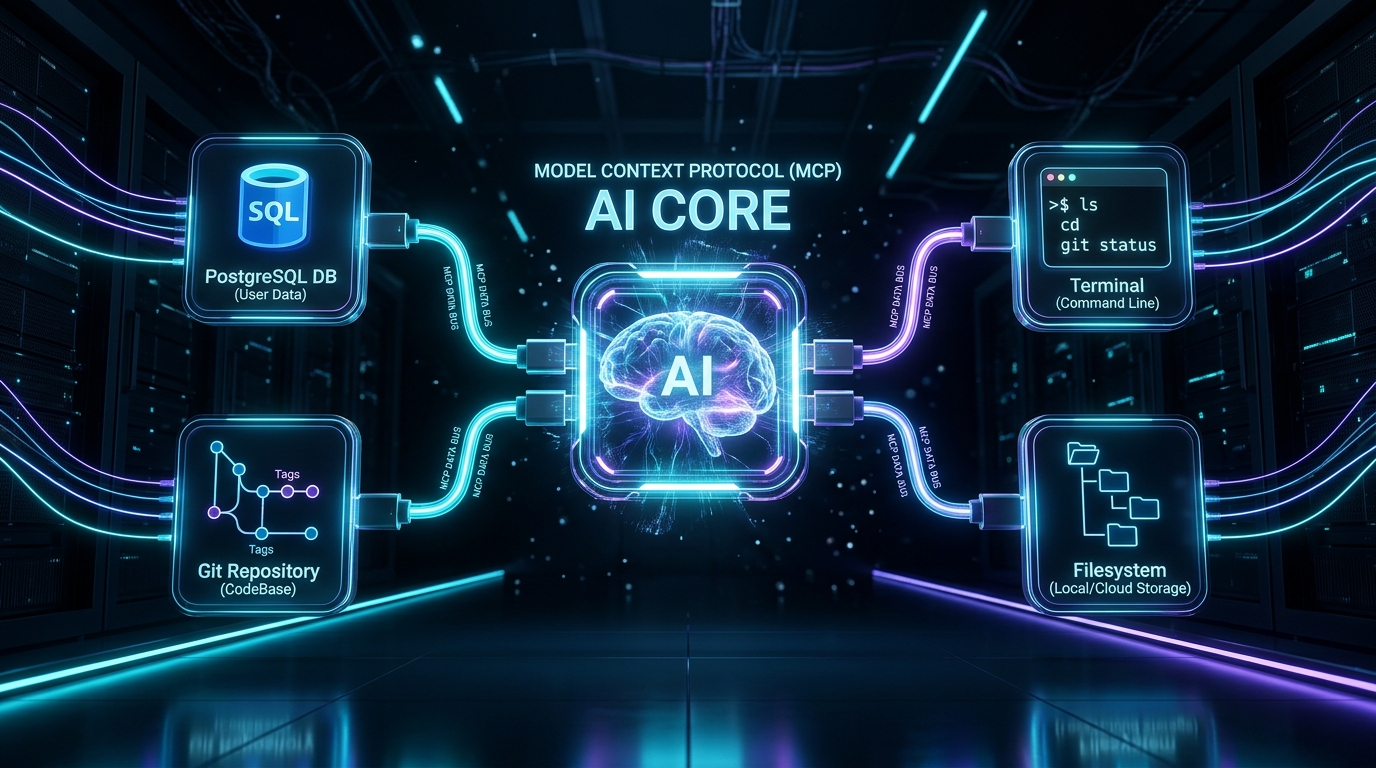
Everything changed when Anthropic introduced the Model Context Protocol (MCP) — an open-source standard rapidly dubbed “The USB-C for Artificial Intelligence.”
In this deep dive, we examine how MCP works under the hood, why leading tools (from Cursor and Claude Desktop to autonomous agents) have standardized on it, how it transforms passive text predictors into autonomous software engineers, and how to build your first production-ready MCP server in Python in five minutes.
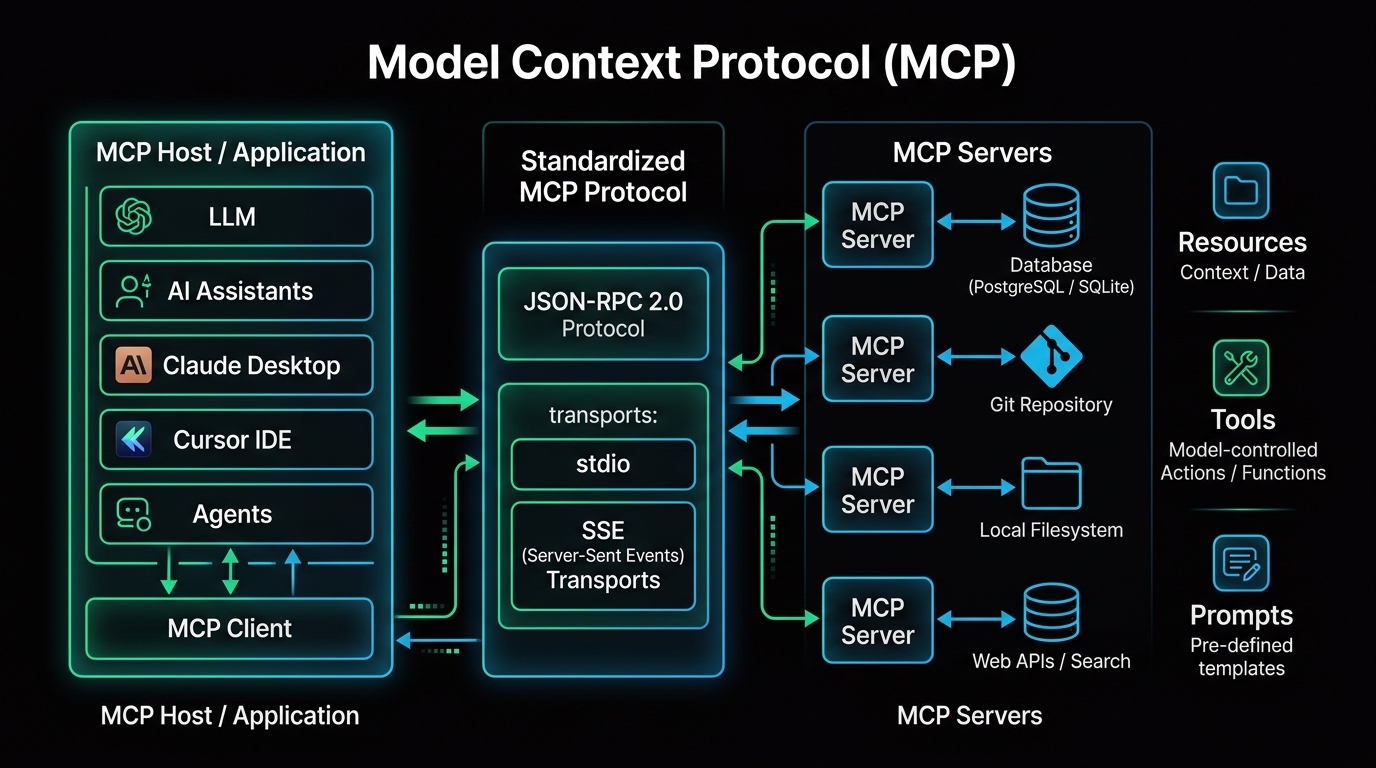 Fig. 1. Architecture of the MCP ecosystem: client applications interface with isolated servers via a standardized JSON-RPC protocol
Why MCP? Resolving the $M \times N$ Integration Nightmare
Before MCP, equipping an AI model with external tooling looked like an unmanageable tangle of spaghetti code:
flowchart TD
    subgraph OldWay["The Legacy Approach: Bespoke Integration Chaos"]
        LLM1[Claude] --> API1[PostgreSQL Connector]
        LLM1 --> API2[GitHub API Script]
        LLM2[OpenAI / GPT] --> API3[LangChain Tool]
        LLM2 --> API4[Custom Slack Bot]
        LLM3[Local Ollama] --> API5[Bash Execution Wrapper]
    end
Whenever an upstream database driver updated or an AI model altered its function-calling token format, downstream integrations shattered.
Model Context Protocol collapses this complexity into $M + N$:
- Tool Creators (e.g., PostgreSQL, Git, Kubernetes, or SaaS platforms) expose a single, lightweight MCP server.
- AI Client Creators (e.g., Cursor, Claude Desktop, VS Code, Zed) implement an MCP client layer.
- Any client can instantly query, manipulate, and coordinate with any server without writing custom glue code!
System Architecture: Under the Hood
The protocol is built upon the battle-tested JSON-RPC 2.0 message specification and organizes around three core entities:
- MCP Host (Client Application):
The primary program driving user interaction. Examples include Claude Desktop, Cursor IDE, Zed, VS Code extensions, or custom autonomous agent loops. The host process launches MCP servers and moderates contextual interactions. - MCP Client:
The protocol adapter inside the host establishing a direct 1-to-1 session with each designated MCP server. - MCP Server:
A lightweight, isolated background process (written in Node.js, Python, Go, or Rust) that interfaces with the target system (database, file tree, cloud API) and exposes structured capabilities.
Two Native Transport Mechanisms
stdio(Standard Input/Output):
The client spawns the MCP server as a local child sub-process, exchanging JSON-RPC payloads viastdinandstdout. This transport is zero-latency, highly secure, and requires zero network port binding (ideal for local developer machines).SSE(Server-Sent Events over HTTP):
The server runs as a standalone network daemon (e.g., in Docker on an internal cloud cluster or VPS), dispatching events over HTTP SSE. This enables centralized database connectors, corporate knowledge bases, and multi-user environments.
The Three Pillars: Tools, Resources, and Prompts
Every MCP server can advertise three standardized primitives to connected AI models:
| Primitive | Definition | Software Analogy | Real-World Example |
|---|---|---|---|
Tools (Actions) | Executable functions the model can trigger to mutate or inspect state. | POST / PUT RPC methods | Executing a SQL query, creating a GitHub PR, restarting a Docker container |
Resources (Data) | Read-only contextual payloads, structured similarly to file endpoints. | GET endpoints / Static files | Database schemas, /var/log/nginx/access.log, internal API specifications |
Prompts (Workflows) | Pre-engineered conversational templates bundled into the server. | Parameterized Macros | An “Analyze production incident” prompt that automatically pulls recent error logs |
Hands-On: Configuring Production MCP Servers in 2 Minutes
The open-source community already provides hundreds of ready-to-use MCP servers.
To equip your AI workspace (such as Claude Desktop or Cursor), configure the central JSON configuration file:
- Windows:
%APPDATA%\Claude\claude_desktop_config.json - macOS:
~/Library/Application Support/Claude/claude_desktop_config.json - Linux:
~/.config/Claude/claude_desktop_config.json
Production Configuration Example: Filesystem, Git & PostgreSQL
1
2
3
4
5
6
7
8
9
10
11
12
13
14
15
16
17
18
19
20
21
22
23
24
25
26
27
28
29
30
{
  "mcpServers": {
    "filesystem": {
      "command": "npx",
      "args": [
        "-y",
        "@modelcontextprotocol/server-filesystem",
        "C:\\Users\\Username\\Projects"
      ]
    },
    "postgres": {
      "command": "npx",
      "args": [
        "-y",
        "@modelcontextprotocol/server-postgres",
        "postgresql://postgres:secretpassword@localhost:5432/mydb"
      ]
    },
    "github": {
      "command": "npx",
      "args": [
        "-y",
        "@modelcontextprotocol/server-github"
      ],
      "env": {
        "GITHUB_PERSONAL_ACCESS_TOKEN": "ghp_yourTokenHere"
      }
    }
  }
}
Restart your client. A hammer icon appears in your chat interface. You can now prompt:
“Inspect the schema of the
userstable in our local Postgres database, draft an SQL migration adding anis_verifiedboolean column, and push it as a Pull Request to our GitHub repository.”
The model autonomously inspects the schema over MCP, generates the migration script, verifies it, and submits the GitHub PR using standardized primitives!
Building a Custom MCP Server in Python in 5 Minutes
Need to expose proprietary infrastructure metrics or an internal microservice? Using the official FastMCP Python SDK, writing an MCP server is simpler than authoring a Flask route.
1. Install the SDK:
1
pip install mcp
2. Create server.py:
Let us build a host telemetry server allowing AI agents to audit live CPU, RAM, and disk utilization:
1
2
3
4
5
6
7
8
9
10
11
12
13
14
15
16
17
18
19
20
21
22
23
24
25
26
27
28
29
import psutil
from mcp.server.fastmcp import FastMCP

# Initialize the server
mcp = FastMCP("System Telemetry Monitor")

@mcp.tool()
def get_system_metrics() -> str:
    """Returns real-time CPU utilization and memory (RAM) consumption."""
    cpu_percent = psutil.cpu_percent(interval=1)
    ram = psutil.virtual_memory()

    return (
        f"CPU Load: {cpu_percent}%\n"
        f"RAM Used: {ram.used / (1024**3):.2f} GB / {ram.total / (1024**3):.2f} GB ({ram.percent}%)"
    )

@mcp.tool()
def check_disk_space(path: str = "/") -> str:
    """Audits available and allocated storage capacity on the specified mount path."""
    disk = psutil.disk_usage(path)
    return (
        f"Disk '{path}': Free {disk.free / (1024**3):.2f} GB of {disk.total / (1024**3):.2f} GB "
        f"({disk.percent}% used)"
    )

if __name__ == "__main__":
    # Launch over the native stdio transport
    mcp.run(transport="stdio")
3. Register It in Your Client Configuration:
1
2
3
4
5
6
7
8
{
  "mcpServers": {
    "system-monitor": {
      "command": "python",
      "args": ["/path/to/server.py"]
    }
  }
}
That is the entire implementation. FastMCP automatically parses function docstrings and type annotations into strict JSON Schema contracts. The AI understands the exact input signature, expected return types, and operational constraints without manual prompting.
Security Architecture: Why MCP Beats Raw Shell Execution
A frequent question from security engineers is: “Why not just give the LLM an unconstrained eval() or bash terminal session?”
Unrestricted terminal execution represents a catastrophic security risk. A hallucinating or prompt-injected model can accidentally execute destructive commands like rm -rf / or leak environment secrets via outbound curl commands.
MCP’s Security Guarantees:
- Principle of Least Privilege (PoLP): The server exposes only granular, pre-approved functions. If a server only defines
get_order_by_id, the LLM cannot physically execute a destructiveDROP TABLE. - Human-in-the-Loop Verification: MCP clients prompt the user with modal approval dialogs detailing exact execution parameters before permitting high-risk operations (such as disk writes or API mutations).
- Process Sandboxing: MCP servers can run in isolated Docker containers or ephemeral execution sandboxes, keeping sensitive host kernels insulated from the agent runtime.
Conclusion: The Foundation of Agentic AI
Model Context Protocol is not another passing trend; it is the foundational plumbing of autonomous software engineering.
By decoupling language model development from data source integration:
- AI assistants graduate from passive conversational chatbots into active, context-aware engineering collaborators.
- Tooling built today will work out of the box with the frontier models of tomorrow.
If you are designing automated workflows, infrastructure monitoring, or AI-powered developer tooling, implementing an MCP server is the highest-leverage engineering investment you can make today.